
By the CentralSound repair team | Fox Lake, IL | Updated October 2026
Quick answer
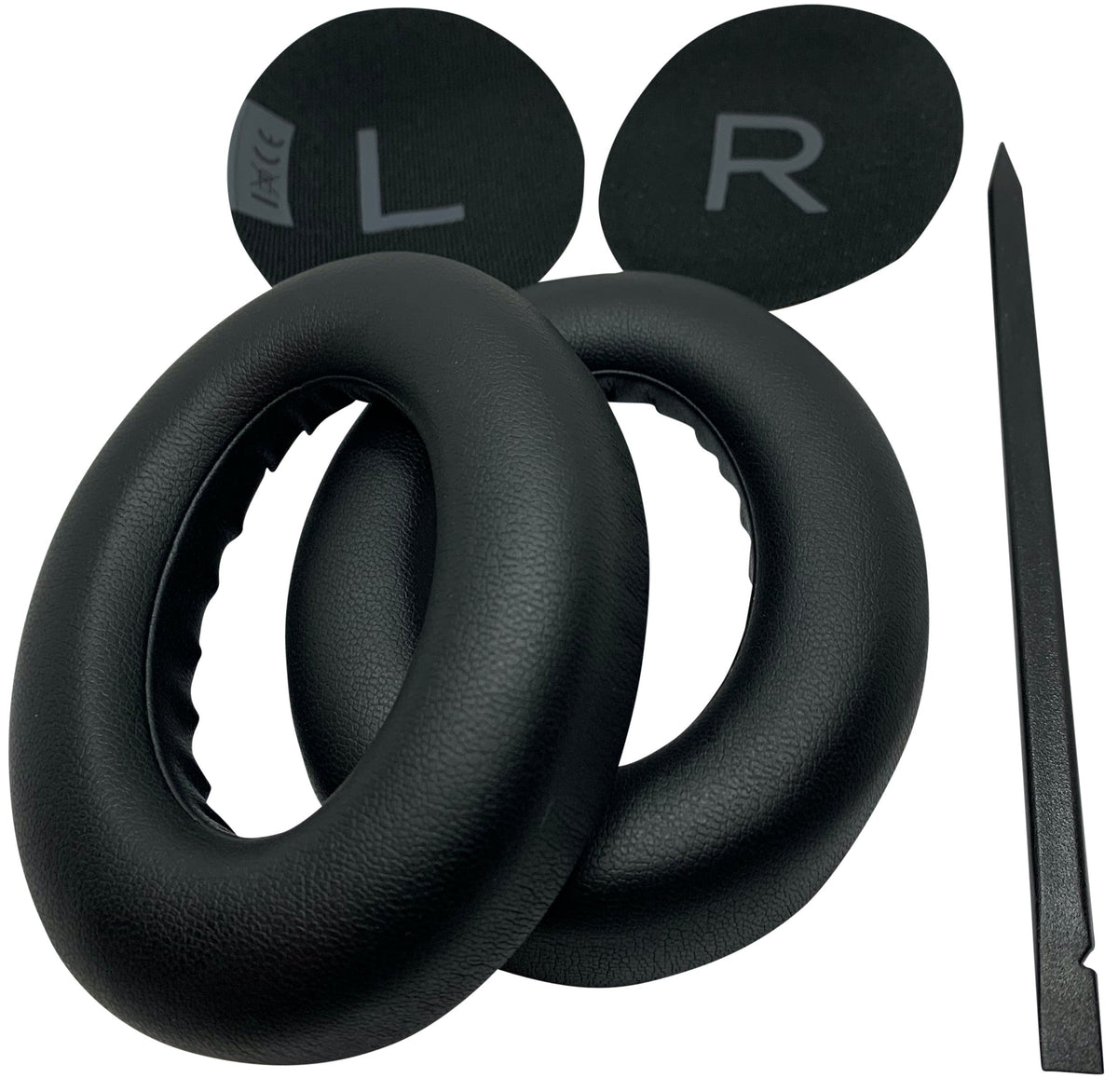
Replace your Bose 700 ear pads when the covering flakes or cracks, the foam stays flat, or noise cancelling suddenly sounds weaker. Pads unclip from the ear cup with a plastic ring, so a swap takes about 10 minutes with the removal tool. Our Bose 700 ear pad set includes both pads, both inner mats (L and R) and the tool.
Signs your Bose 700 ear pads need replacing
| What you notice | What it means |
|---|---|
| Flaking or cracked covering, black bits on your ears or neck | The surface has broken down from heat, sweat and skin oils. It will not recover. |
| Pads look flat or your ears touch the inside of the cup | The foam has compressed. Comfort and the seal around your ear drop off. |
| Noise cancelling feels weaker, more outside noise, less bass | Worn pads leave small gaps, and noise cancelling depends on a good seal. |
| Pad pops loose or one side sits crooked | The clip ring or the inner mat has worn. Replace the pad and mat together. |
| Smell that cleaning does not remove | Sweat has soaked into the foam. Fresh pads are the only real fix. |
What comes in the replacement set
- 2 memory foam ear pads with the clip-on ring attached
- 2 inner mats, marked L and R
- 1 removal tool
Colors: Black and Luxe Silver. These pads are made for the Bose Noise Cancelling Headphones 700 only. The QuietComfort 45, QC35 and QC Ultra use different pads; see the FAQ below.
How to replace Bose 700 ear pads
- Pry off the old pad. Slide the removal tool between the pad and the ear cup and work around until the plastic ring unclips.
- Remove the old mat. Peel out the fabric mat and the foam under it.
- Clean the ear cup. Scrape off leftover adhesive so the new mat sits flat.
- Fit the new mat. Peel the backing and press it in. Match L and R to the correct side.
- Clip on the new pad. Line it up and press around the edge until it clicks in all the way. Check for gaps.
- Repeat on the other side.
Prefer to watch? Our step-by-step video and full photo guide are here: How to Replace Bose 700 Ear Pads.
Make new pads last longer
- Wipe the pads with a soft, slightly damp cloth after long or sweaty sessions, then let them air dry.
- Store the headphones in a case instead of loose in a bag, so the pads are not crushed.
- Avoid leaving them in a hot car or in direct sun for long periods.
- Replace both sides at the same time so the seal and sound stay even.
Bose 700 ear pad replacement set
Pads, L and R mats and removal tool. Usually ships within one business day from Fox Lake, IL.
Shop Bose 700 Ear PadsFrequently asked questions
How often should Bose 700 ear pads be replaced?
It depends on use, heat and sweat. Daily wearers often see flaking or flat foam within one to two years. Replace them as soon as you see the signs above, since worn pads also weaken noise cancelling.
Do Bose QC45 or QC35 ear pads fit the Bose 700?
No. The Bose 700 uses its own clip-on pad. For other models see our QC45 ear pads, QC35 ear pads or QC Ultra ear pads.
Do I need any tools?
No. The removal tool is included in the set.
Will new pads fix weak noise cancelling?
If the cause is a worn seal, yes. Fresh pads restore the seal that noise cancelling relies on. If noise cancelling is still weak with new pads fitted, the problem is likely electronic, and Bose support is the better place to start.
Not sure you have the Bose 700?
Use our Find My Model tool or the Bose identification guide.


Leave a comment
All comments are moderated before being published.
This site is protected by hCaptcha and the hCaptcha Privacy Policy and Terms of Service apply.