
Why Sony Battery Decisions Matter for Everyday Listening
Sony wireless headphones live or die by battery health. When the battery starts to fade, it usually shows up at the worst times, like on the train, during a long video call, or halfway through a flight. The sound can still feel rich and the noise canceling can still block the world, but the power no longer keeps up with your day.
At CentralSound, we see this a lot with Sony WH-1000XM over-ear models and WF true wireless earbuds. This is not about learning to solder from scratch or tearing your headphones apart on the kitchen table without a plan. It is about understanding the tradeoffs around Sony headphone battery replacement, what you really gain with a new model, and when a parts-based upgrade makes more sense than starting over with a completely new headphone.
When your headphones shut down during a work session, or drop from half battery to dead in a few minutes, it is more than a small annoyance. It can interfere with focus, comfort, and even travel plans. That is why it helps to step back and look at the whole picture before you decide what to do next.
How Sony Batteries Age Across Popular Models
Lithium-ion batteries slowly wear out with every charge cycle. On Sony headphones, that wear shows up in slightly different ways depending on the model and age.
For the WH-1000XM3, WH-1000XM4, and WH-1000XM5 over-ear noise-canceling models, common signs include:
- Faster drain than when they were new
- Random shutoffs, even while audio is playing
- Slower charging or stopping before a full charge
- One earcup feeling warmer during or right after charging
Older lines, like the WH-H900N, MDR-1000X, and some XB-series, can still sound great but often become “always wired” headphones when the battery ages. You might notice:
- Short wireless runtime, then needing to plug in a cable
- Power buttons that feel slower to respond
- Noise canceling that cuts out before the audio stops
For WF-1000XM3 and WF-1000XM4 earbuds, battery aging can look a bit different again:
- One earbud dying sooner than the other
- The case no longer topping off both buds fully
- Big swings in the battery numbers on your phone
All of this ties back to how lithium-ion cells age. Over time, you get:
- Fewer total hours per charge
- Less accurate battery percentage readings
- Headphones shutting down at 20 to 30 percent reported charge
Sony has used different battery designs and capacities across generations. A WH-1000XM4 pair that has seen heavy daily use for a few years may be near the end of its original battery life, while a lightly used set of the same model might still hold close to a full day. Age, charge habits, and heat all shape how quickly things decline.
Weighing Battery Replacement Versus New Sony Models
When battery problems show up, many people think they only have two choices: attempt a complex repair or buy a brand-new set. In reality, it is more about comparing what you already like to what you would gain, and what you would give up, by changing models.
Take WH-1000XM3 vs. WH-1000XM5:
- The XM5 has more refined noise canceling and updated tuning
- It usually offers better comfort for longer listening
- You may gain features like stronger Bluetooth behavior or multipoint on newer models
- You lose the foldable hinge that many XM3 owners value for travel
For WH-1000XM4 vs. WH-1000XM5, the gap is smaller. An XM4 with a healthy battery can already handle a full workday, daily commuting, and long trips for many users. If you already like the way your XM4 fits and sounds, a battery refresh can keep that familiar experience going without learning a new headband shape or sound profile.
There are hidden tradeoffs too. Replacing the entire headphone means more hardware going into a drawer or into the waste stream. A parts-first approach, using a Sony headphone battery replacement kit that matches your exact model, keeps something you already know and like in use.
This is also a good time to think beyond the battery. Fresh ear pads, a new headband cushion, and a backup cable for wired listening can transform an older Sony set. A single battery change paired with new wear parts often makes older WH and MDR models feel surprisingly close to current releases, at a fraction of the cost of starting from zero.
Practical Tradeoffs of DIY Sony Battery Replacement
Opening modern headphones is not as simple as popping off a back cover. Sony designs are compact and packed with small parts, so any work on them should be slow and careful.
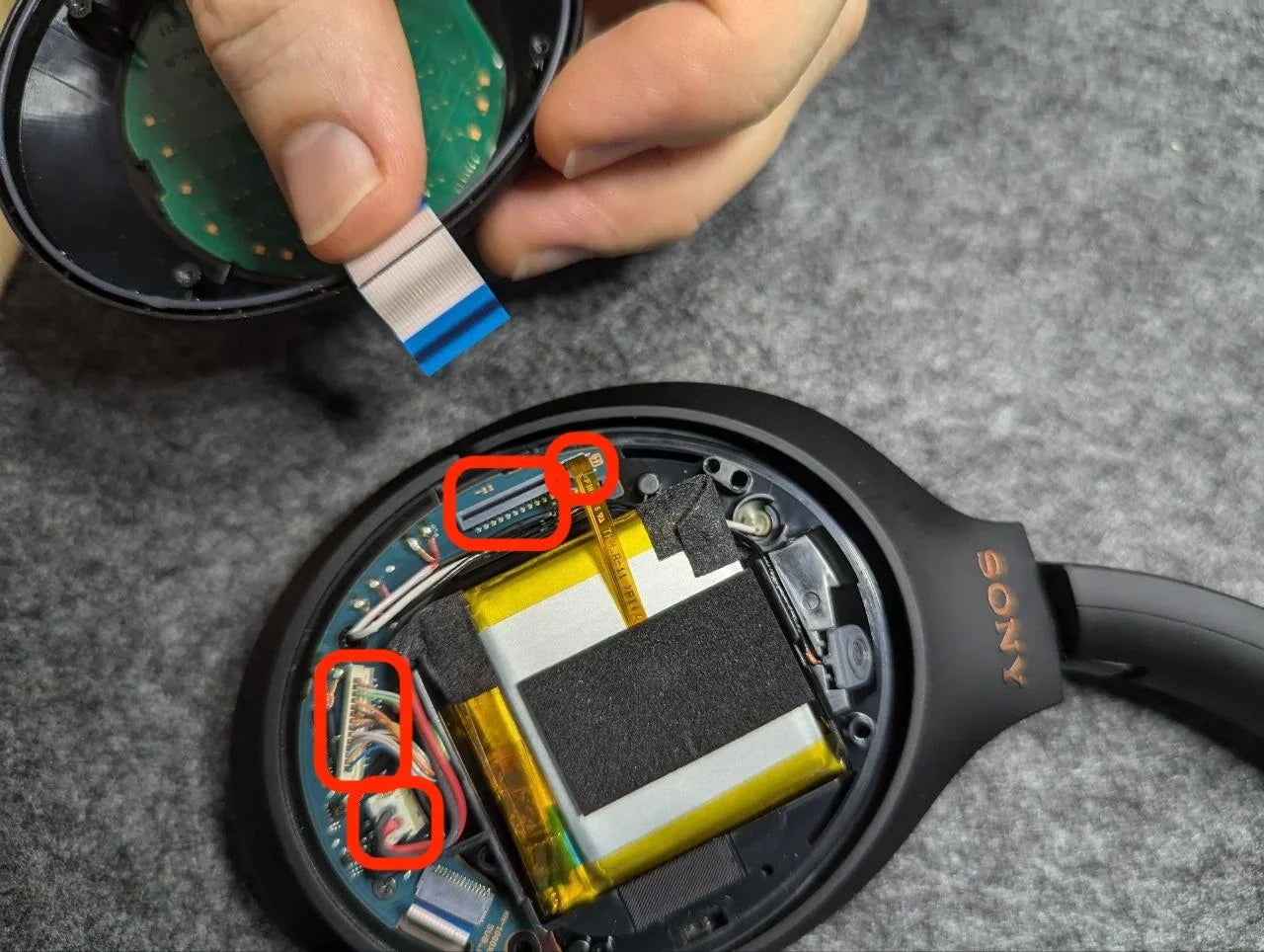
For WH-1000XM3 and WH-1000XM4, replacing a battery usually means:
- Removing the ear pads to access hidden screws
- Separating the earcup shells without pulling on ANC microphones
- Working around delicate ribbon cables that connect the boards
The WH-1000XM5 steps this up a bit. The design is more integrated, with more adhesive and tighter spaces. That means:
- A higher chance of small cosmetic marks if the process is rushed
- More care needed to avoid stressing the headband and pivot points
- Less room inside for fingers and tools
So what are the real tradeoffs?
Pros of a parts-based battery swap:
- Lower total spend than buying a brand-new headphone
- Less electronic waste and fewer items thrown out
- Ability to keep a sound and fit your ears are already used to
- Opportunity to upgrade other parts at the same time (pads, headband, cables)
Cons to consider:
- Risk of damaging internal wiring or microphones
- Possible loss of some water or sweat resistance after opening
- Small cosmetic marks or gaps if things are not reassembled cleanly
- Time and patience required for careful work
CentralSound focuses solely on supplying model-specific batteries and related headphone parts. We provide parts kits so owners have the pieces they need and less guesswork when they choose to service their own headphones or work with an independent technician. Any installation or repair work itself is performed by the headphone owner or by a separate service provider of their choice, not by CentralSound.
Common Sony Battery and Power Failures to Watch
Before committing to any plan, it helps to confirm that the battery is really the problem. Several power issues can look similar on the surface.
Watch for patterns like:
- Headphones that power on only when plugged into USB
- Units that shut off the instant you unplug the cable
- Very long charging times without much extra playtime
- Earcups overheating near the battery area during charging
- One side cutting audio or ANC while the other stays on
These can point to different root causes:
- A tired or worn battery cell that can no longer hold charge
- A damaged USB or charge port from repeated stress
- Internal power or charging circuitry failures
A fresh battery can help in cases where the cell is the weak link. If the port or the main board is damaged, replacing the battery alone may not fix the problem, and a full replacement headphone might make more sense.
Age-related wear also shows up in other parts at the same time:
- Ear pads that are flat, cracked, or flaking, which hurts isolation and makes ANC feel weaker
- Headbands with cracks or loose hinges from heavy travel or folding
- Worn or noisy cables on older wired or hybrid models, which can cause audio dropouts that feel like battery trouble
Looking at these signs together gives a clearer picture of how much life is left in your current Sony pair and which specific parts are worth replacing.
Plan Your Next Step for Longer-Lasting Sony Listening
A simple self-check helps you decide what comes next. Take a moment and note:
- How many hours you really get from a full charge
- Any odd charging behavior or heat while plugged in
- The condition of your ear pads and headband
- Any cracks, loose hinges, or Bluetooth problems
If you still love the sound, the fit is comfortable, and the core features work as expected, a parts-first path can be a smart move. A Sony headphone battery replacement kit, fresh cushions, and maybe a new cable can stretch the life of WH-1000XM and related models for years of daily use.
If you are struggling with multiple major issues at once, like unstable Bluetooth, dead drivers, or broken hinges, then a new model may be the better long-term answer. Either way, it helps to know your exact model number from the headband or slider, then look up compatible Sony parts from a specialist parts retailer such as CentralSound so you can upgrade by parts or upgrade by model with confidence, without relying on a repair service.
Restore Your Sony Headphones To Their Best Performance
If your headphones are losing power faster than they used to, our Sony headphone battery replacement options can help you bring them back to life instead of buying a new pair. At CentralSound, we source quality parts so you can enjoy the sound you love with reliable battery performance. If you are unsure which part you need or have questions about installation, contact us and we will guide you through the next steps.

Leave a comment
All comments are moderated before being published.
This site is protected by hCaptcha and the hCaptcha Privacy Policy and Terms of Service apply.